

Common NF-e Issuance Errors – Q&A Guide
Possible Errors of the NF-e Issuance Tool on TikTok Shop Brazil
Some sellers using TikTok Shop Brazil’s NF-e Issuance Tool may encounter error messages when attempting to issue an invoice, similar to the example below: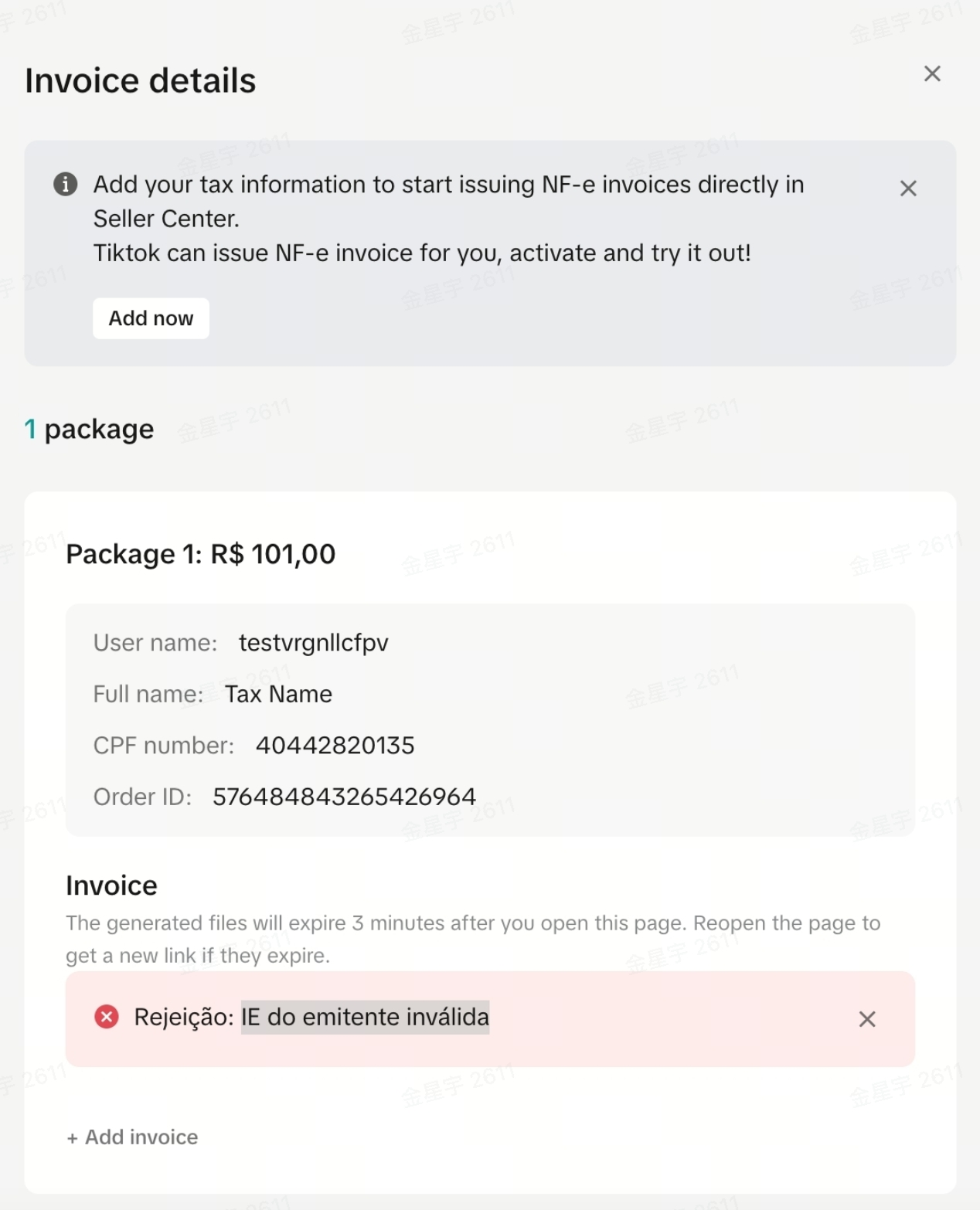
To quickly locate a specific error, use your browser’s search function (or the shortcut Ctrl+F on your keyboard) and type in the error code you are looking for.
Error 33001017 - In the process of invoice issuance
The current order is already in the process of invoice issuance. Please wait a moment and try issuing the invoice again later, as the system is already processing this order’s NF-e.Error 33013001 - Invalid NF-e series number
The Series is a code of up to 3 digits used to identify a group of invoices issued by the same establishment. It helps differentiate between various types of insurance or systems. This error indicates that the “Series” field was filled incorrectly. It must be a numeric value between 1 and 999.How to fix it?
- Go to My Account > Account Settings > Tax Information on TikTok Shop Seller Center.
- Ensure the “Series” field contains only numbers within the range of 1 to 999.
- Save the correction and recreate the NF-e.
Error 33013002 - Invalid CST-PIS/COFINS
CST is a Brazilian tax classification code used to define how a product or service is taxed under federal (PIS, COFINS, IPI), state (ICMS), and municipal systems. Specifically for PIS and COFINS, the CST determines how these contributions apply to each transaction, based on the nature of the product and your company’s tax regime.This error occurs when the CST-PIS/COFINS (Código de Situação Tributária) assigned to the product is missing or invalid. To resolve it, go to the product information page in your TikTok Shop Seller Center and update the CST field. Make sure the PIS and COFINS Tax Situation Code is valid and correctly reflects your product’s tax status.
Error 33013003 - Invalid or Missing CFOP
CFOP (Código Fiscal de Operações e Prestações) is a 4-digit fiscal code used in electronic invoices (NF-e) to classify the type of transaction, such as sales, returns, transfers, imports, or exports.Each CFOP code corresponds to a specific tax treatment and is essential for accurate reporting to SEFAZ.
To resolve this issue, go to the product information page in your TikTok Shop Seller Center and ensure that the CFOP is correctly filled in, it is a valid 4-digit number, and matches the nature of the transaction (e.g., sale, return, interstate transfer). If you are unsure which CFOP code to use, please consult your tax advisor.
Error 33013004 - Invalid invoiced amount
The total invoice amount is negative, which is not allowed. Check the order amount, make sure the total is greater than zero. Correct and recreate the NF-e.Error 33013005 - Invalid CNPJ Number
The CNPJ provided is invalid. A valid CNPJ must be a 14-digit number assigned by the Brazilian Federal Revenue (Receita Federal) when the company is established.Error 33013006 - Invalid or Missing CEST Code
The CEST (Código Especificador da Substituição Tributária) is a 7-digit code used to identify whether a product or service falls under Brazil’s tax substitution system for PIS/COFINS. This error occurs when the system detects that the CEST code for a given product is missing or invalid.To resolve this issue, ensure that a valid 7-digit CEST code is provided for the product. You can check the validity of the CEST code through the official SEFAZ website.
Error 33013007 - Invalid or Missing NCM Code
The NCM (Nomenclatura Comum do Mercosul) is an 8-digit classification system used in Brazil for customs clearance, tariff calculation, and tax reporting. It functions similarly to the international HS (Harmonized System) code and is required for accurate tax compliance.This error appears when the NCM code provided for a product is either missing or invalid. To fix the issue, please ensure that a valid 8-digit NCM code is assigned to the product. You can verify the correct NCM code using the SEFAZ database.
Error 33013008 - Digital certificate expired
The company’s digital certificate has expired, and NF-e issuance cannot proceed. Please update your digital certificate on the Tax Information section of your Account Settings page.Error 33013009 - Invalid Buyer CPF
This error occurs when the CPF (Cadastro de Pessoas Físicas) number provided by the buyer is invalid. As the CPF is a mandatory taxpayer identification number for individuals in Brazil, a valid CPF is required for NF-e issuance. To resolve this, please contact the buyer and ask them to provide a valid CPF.Error 33013010 - CNPJ Not Registered
This error indicates that the CNPJ (Cadastro Nacional da Pessoa Jurídica) number associated with your business is not registered with SEFAZ (Secretaria da Fazenda). To resolve this, please verify the registration status of your CNPJ with SEFAZ.Error 33013011 - Invalid FCI
The FCI (Ficha de Conteúdo de Importação) is a required document in Brazil used to declare the origin and content of imported products, especially for purposes related to ICMS tax substitution. This error indicates that the FCI provided for the current product is either missing or invalid.Please go to the product information page and ensure the correct FCI code is entered. After updating the product details with the valid FCI, you can recreate the NF-e.
Error 33013012 - Inconsistent Tax Regime Provided
The Tax Regime indicated in your NF-e does not match the regime registered with SEFAZ (the Brazilian Tax Authority).In Brazil, businesses must declare their tax regime (e.g., Simples Nacional, Lucro Presumido, or Lucro Real) when registering with SEFAZ. This tax regime determines how your company is taxed and directly affects how electronic invoices (NF-e) are validated. If the tax regime used when issuing the NF-e differs from the one officially registered, the invoice will be rejected.
Please go to your Account Settings > Tax Information page and confirm that the tax regime selected matches the one registered with SEFAZ. If you are unsure of your tax regime, contact your accountant or check your registration details on the SEFAZ portal.
Error 33013013/33013014 - Invalid CFOP Code for Operation Type
The CFOP (Código Fiscal de Operações e Prestações) code provided does not match the expected format for the type of operation (inbound or outbound).CFOP is a 4-digit fiscal code used to classify the nature of goods or service transactions for tax purposes in Brazil.
- For inbound operations (entrada), such as purchases and imports, the CFOP must begin with 1, 2, or 3.
- For outbound operations (saída), such as sales and exports, the CFOP must begin with 5, 6, or 7.
Please review the CFOP code assigned to your product and ensure it matches the correct type of transaction. If needed, consult your accountant for proper CFOP classification.
Error 33013015 - Invalid CFOP for Intrastate Transaction
This order is classified as a transaction within the same state, but the CFOP code provided corresponds to an interstate operation.The CFOP code used is incorrect for an intrastate (within the same state) transaction. Replace the CFOP code with one that correctly represents an intrastate transaction and recreate the NF-e.
Error 33013016 - CFOP Does Not Match the CST Code
Each CST code is associated with specific tax rules and must be used with a compatible CFOP. Using an incompatible combination may result in rejection by SEFAZ.The CFOP code provided does not align with the corresponding CST (Tax Situation Code for PIS and COFINS). Replace the CFOP code with one that matches the provided CST.
Error 33013017 — Invalid EAN/GTIN Code
EAN or GTIN (Global Trade Item Number) is a standardized 13-digit barcode used to uniquely identify products in commercial transactions. SEFAZ validates this code against the national registry. If the product’s GTIN is not found or incorrectly formatted, the NF-e will be rejected.Please ensure the EAN/GTIN code contains exactly 13 digits and is properly registered with SEFAZ’s national GTIN database (Cadastro Centralizado de GTIN – CCG).
Error 33013018 - EAN/GTIN is inconsistent with NCM.
The GTIN/EAN code provided for the product does not align with the expected format or category defined by the NCM (Nomenclatura Comum do Mercosul). The NCM is used for tax classification, and SEFAZ validates whether the GTIN is appropriate for the declared NCM.Please check that the GTIN/EAN code entered for the product contains exactly 13 digits and matches the NCM classification of the product. If there is a mismatch, update the GTIN with one that is valid and properly registered under the corresponding NCM in the national GTIN database (CCG).
Error 33013019 - EAN/GTIN is inconsistent with CEST.
The GTIN, commonly referred to as EAN-13, provided for the product does not match the expected value associated with the declared CEST (Código Especificador da Substituição Tributária). SEFAZ verifies whether the GTIN is valid for the specific CEST code.Please ensure that the GTIN/EAN entered for the product is a valid 13-digit number and corresponds to the expected GTIN value for the selected CEST. If there is a mismatch, replace it with a valid GTIN properly registered and associated with the CEST in the national GTIN database (Cadastro Centralizado de GTIN – CCG).
Error 33013020 - NF-e cancellation time window exceeded.
According to SEFAZ regulations, each NF-e must be canceled within a specific time frame after issuance. This error indicates that the deadline for cancellation has already passed.The NF-e can no longer be canceled through the standard process. If it is necessary to reverse the transaction, we recommend issuing a return NF-e instead, following the appropriate procedures for returns.
Error 33013021 - NF-e cannot be canceled
Once an NF-e is associated with a CTe (Conhecimento de Transporte Eletrônico), cancellation is no longer permitted according to SEFAZ regulations. The CTe serves as the official transport document, and its linkage to the invoice finalizes the NF-e process.Error 33013022 - System error
System error – an unexpected issue occurred. Try again later. If the issue persists, contact TikTok Shop merchant support for assistance.Error 33013023 - Seller need to complete the NF-e issuance accreditation process with the Sefaz of their state
This error means that the issuer is not yet authorized by SEFAZ to issue electronic invoices. This cas such as:- Companies that have just been created and have not yet completed their registration with SEFAZ;
- Companies that were previously authorized but currently have pending issues with SEFAZ or the Federal Revenue service.