

Tax FAQs
Disclaimer: Below FAQ is just for your reference and the does not constitute any tax advice or guidelines. If sellers have any tax questions, they should be advised to consult their tax accountants/advisors.
1) Federal Tax ID ("CNPJ")The CNPJ is assigned by the Brazilian Federal Revenue and it legally identifies a business in Brazil. This number is essential for issuing invoices, paying taxes, obtaining licenses, filing reports and fulfilling other tax obligations of the company.
The CNPJ consists of 14 digits in the format XX.XXX.XXX/XXXX-XX, where:
On the website https://www.sintegra.gov.br/, it is possible to consult the State Tax ID, through informing the CNPJ by clicking on the State where the seller is based.
3) Digital CertificateThe seller must have a digital certificate of type A1 or A3, which ensures the authenticity and security of transmitting information. See below the main comparison of both types:
A1 Certificate: It is more suitable for medium to large companies that need to issue a significant volume of NF-e and prioritize agility and practicality. Its main disadvantage is security, as the file can be copied or corrupted if the device is not properly protected.
A3 Certificate: It is more suitable for companies that need higher security in the digital signing process, especially those that issue electronic invoices less frequently or need extra protection to prevent fraud. It is also recommended for companies that seek to ensure greater control over the certificate's use.
On the website of the National Institute of Information Technology (ITI), you can find more information about the Digital Certificate and which companies are regulated to generate them.

It is intended for sellers who are not required to issue NF-e invoices due to state regulations.
How to issue NFA-e invoices?Through the SEFAZ (State Department of Finance) website of your state, you fill in your store's details to
generate the invoice. At the end of the process, the access key for the document will be provided along with the SEFAZ CNPJ (corresponding to the operating state).
Even with the functionality of individual invoices, as a MEI (Microeempreendedor Individual), you do not have the option to issue invoices in bulk, whether through an ERP. Issuing invoices individually requires a lot of work and time, so we recommend that you change your CNPJ to a Microenterprise (ME), a Small Business (EPP), or a Medium/Large Enterprise.This way, you will be able to obtain the State Registration and issuue invoices more quickly and efficiently, with the bulk issuance feature.
Why issue an Individual Invoice?To ship your orders according to your state's rules, you will need to issue an Individual Invoice. Otherwise, you will not be able to print your labels, and your sales may be canceled. Additionally, if you do not issue the Individual Invoice, your account may be suspended until the situation is regularized.
Therefore, the first step is to access the SEFAZ website of your state. There, you will find all the information and guidelines needed to issue your invoices.
If you have any questions about single tax invoices, please consult your tax accountant.
The simplified DANFE is a reduced version of the DANFE that contains the mandatory information of the NF-e.
Additionally, the document can also be printed as a sticker label to be directly applied to the product box, optimizing time and costs in your operation.
If you have any questions about DANFE, please consult your tax accountant.
Where could I download Simplified DANFe?You could print Simplified DANFe after uploading NF-e invoices for your orders
Invoice will be printed according to your selected printing documents

TikTok Shop cannot issue an invoice for fees you paid to other parties, including but not limited to creators and TTS partners (TikTok Affiliate Partner, Creator Agency Partner etc.)
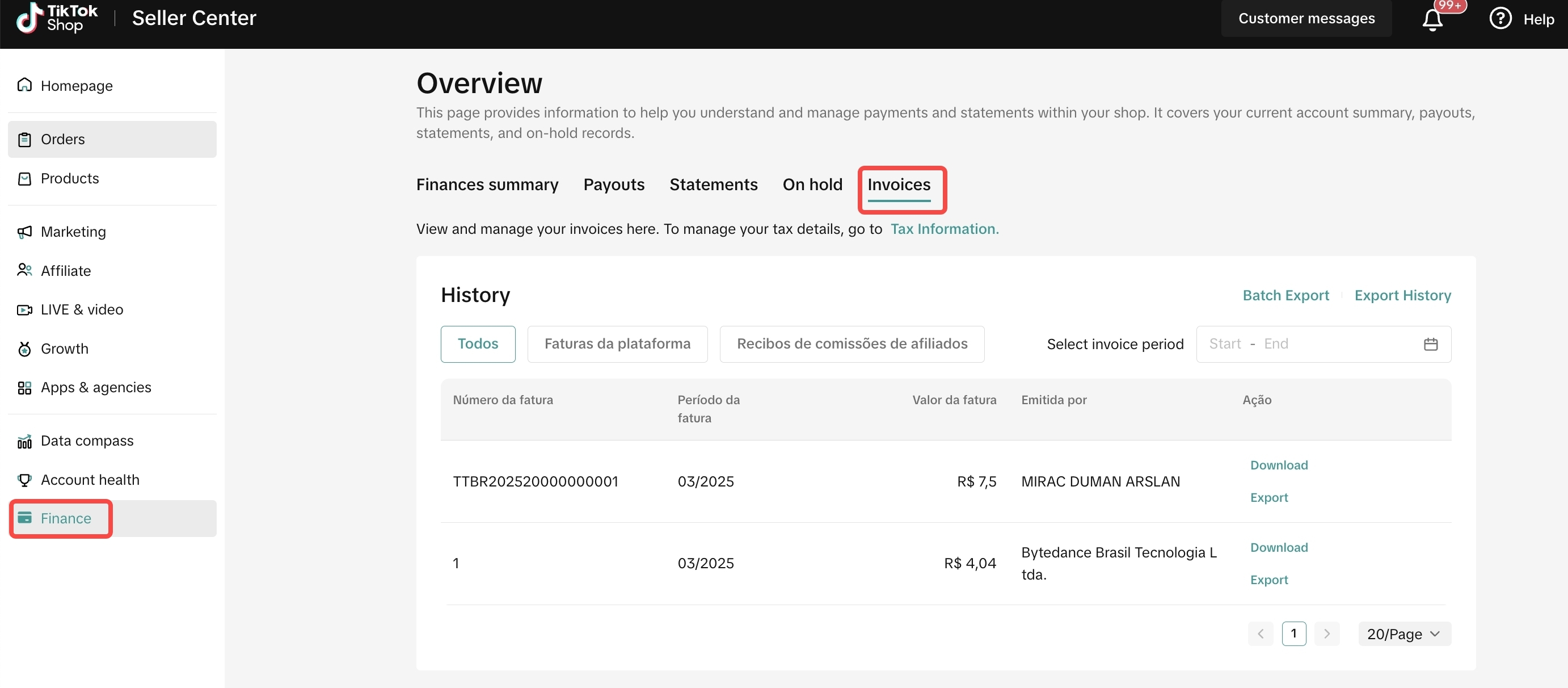
In addition, TikTok Shop generates the billing statement of creators' commission you paid to creators and you could download it by accessing sellers center->Fiance.
What is an NF-e?
The NF-e ("Nota Fiscal Eletrônica") is a digital tax document required by Brazilian legislation to record commercial transactions. It is mandatory for businesses when selling goods and it must accompany the parcel throughout the entire transportation process. The NF-e ensures tax compliance and allows real-time reporting to the tax authorities.NF-e Issuance Requirements
The issuance of an Electronic Invoice (NF-e) requirement complies with several technical and tax requirements. Below are the main requirements to issue an NF-e:1) Federal Tax ID ("CNPJ")The CNPJ is assigned by the Brazilian Federal Revenue and it legally identifies a business in Brazil. This number is essential for issuing invoices, paying taxes, obtaining licenses, filing reports and fulfilling other tax obligations of the company.
The CNPJ consists of 14 digits in the format XX.XXX.XXX/XXXX-XX, where:
- The first 8 digits represent the company number.
- The next 4 digits indicate whether it is a parent company or a branch.
- The last 2 digits are used for validation and ensure the authenticity of the number.
On the website https://www.sintegra.gov.br/, it is possible to consult the State Tax ID, through informing the CNPJ by clicking on the State where the seller is based.
3) Digital CertificateThe seller must have a digital certificate of type A1 or A3, which ensures the authenticity and security of transmitting information. See below the main comparison of both types:
A1 Certificate: It is more suitable for medium to large companies that need to issue a significant volume of NF-e and prioritize agility and practicality. Its main disadvantage is security, as the file can be copied or corrupted if the device is not properly protected.
A3 Certificate: It is more suitable for companies that need higher security in the digital signing process, especially those that issue electronic invoices less frequently or need extra protection to prevent fraud. It is also recommended for companies that seek to ensure greater control over the certificate's use.
On the website of the National Institute of Information Technology (ITI), you can find more information about the Digital Certificate and which companies are regulated to generate them.
How to issue NF-e invoices?
To generate and send NF-e, you need an invoicing tool (NF-e issuance software). You can either use your ERP system, if it supports NF-e, or subscribe to a certified NF-e issuance software. The software must be able to (i) generate the NF-e in XML format, (ii) communicate with SEFAZ and (iii) transmit the electronic invoice.High Level Flow:- Sellers provide the data on the NFe issuance software;
When: Between the purchase order approval and the shipping starting time.
- The NFe issuance software generates the NFe XML file, and then sends it to the Government Webservice, through internet connection;
- In the NFe validation step, the Government Webservice analyses if the NFe data is correct in terms of (i) XML file structure and (ii) NFe rules;
- Government webservices return the NFe to sellers' NFe issuance software;
- Once the NFe is validated, the NFe issuance software is able to print the DANFE and the simplified DANFE, which are mandatory for LSP shipping the package.
How to issue NF-e invoice for free samples orders funded by merchants
Please note instructions below are only applicable to free sample orders funded by merchants, not including the sample orders paid via sample coupon or gift card funded by TikTok Shop.- How to issue NF-e free sample invoices? See information below for your reference:
Free Samples | ICMS tax base | Product Value | Nature of operation | CFOP (subject to merchant's discretion, below CFOP is just from your reference) | |
Ship from and Ship to: Intrastate | Ship from and Ship to: Interstate | ||||
| Merchantable items | - MEI and Simples Nacional: 0- CNPJ - other tax regime: Market Value or at least 75% of the Market Value, subject to merchant's discretion | Market Value or at least 75% of the Market Value, subject to merchant's discretion | Bonificação - Sem finalidade de Revenda | 5910 | 6910 |
| Non-merchantable items | Market Value or at least 75% of the Market Value, subject to merchant's discretion | Brindes | 5910 | 6910 | |
| Merchantable items in a reduced size (e.g., 20% of its original size or quantity) | nominal value (e.g., R$ 0,01) if product has no market value, subject to merchant's discretion | Amostra Grátis | 5911 | 6911 | |
- CFOP code list for your reference
What is single tax invoice (NFA-e/Nota Fiscal Avulsa)
An Individual Invoice NFA-e is a document issued individually, with the same validity as other types of invoices.It is intended for sellers who are not required to issue NF-e invoices due to state regulations.
- To what kind of sellers is mandatory to issue individual invoice NFA-e?
How to issue NFA-e invoices?Through the SEFAZ (State Department of Finance) website of your state, you fill in your store's details to
generate the invoice. At the end of the process, the access key for the document will be provided along with the SEFAZ CNPJ (corresponding to the operating state).
Even with the functionality of individual invoices, as a MEI (Microeempreendedor Individual), you do not have the option to issue invoices in bulk, whether through an ERP. Issuing invoices individually requires a lot of work and time, so we recommend that you change your CNPJ to a Microenterprise (ME), a Small Business (EPP), or a Medium/Large Enterprise.This way, you will be able to obtain the State Registration and issuue invoices more quickly and efficiently, with the bulk issuance feature.
Why issue an Individual Invoice?To ship your orders according to your state's rules, you will need to issue an Individual Invoice. Otherwise, you will not be able to print your labels, and your sales may be canceled. Additionally, if you do not issue the Individual Invoice, your account may be suspended until the situation is regularized.
Therefore, the first step is to access the SEFAZ website of your state. There, you will find all the information and guidelines needed to issue your invoices.
If you have any questions about single tax invoices, please consult your tax accountant.
What are DANFE and Simplified DANFE?
The DANFE (Auxiliary Document of the Electronic Invoice) is a printed document used as a representation of the Nota Fiscal Eletrônica (NFe - which is an XML file). The DANFE accompanies the goods during transportation and allows for quick consultation of the NF-e.The simplified DANFE is a reduced version of the DANFE that contains the mandatory information of the NF-e.
Additionally, the document can also be printed as a sticker label to be directly applied to the product box, optimizing time and costs in your operation.
If you have any questions about DANFE, please consult your tax accountant.
Where could I download Simplified DANFe?You could print Simplified DANFe after uploading NF-e invoices for your orders
Step | Single Download | Batch Download |
| Access seller center-> Manage Orders-> To ship, select "invoice uploaded" | 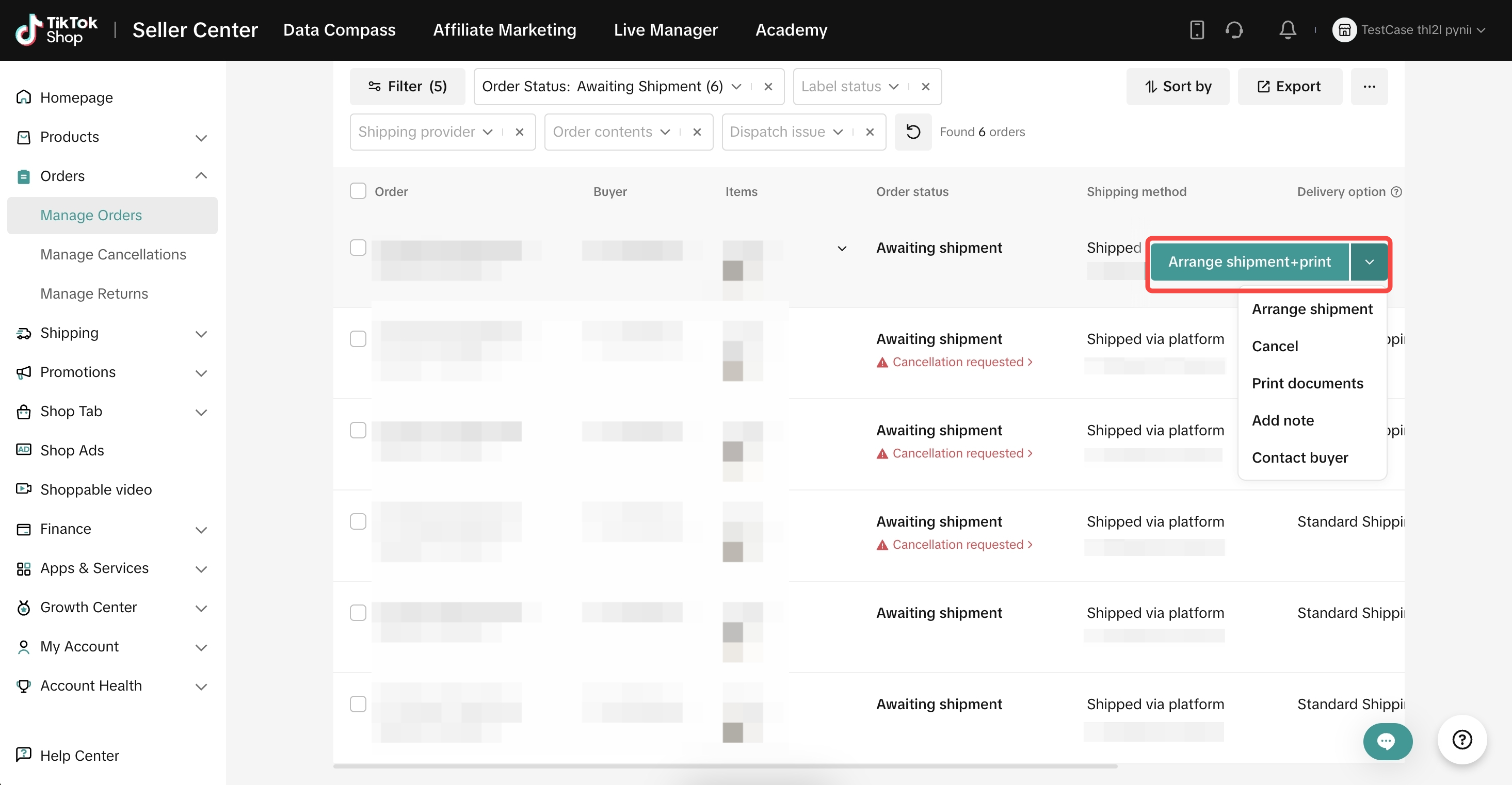 | 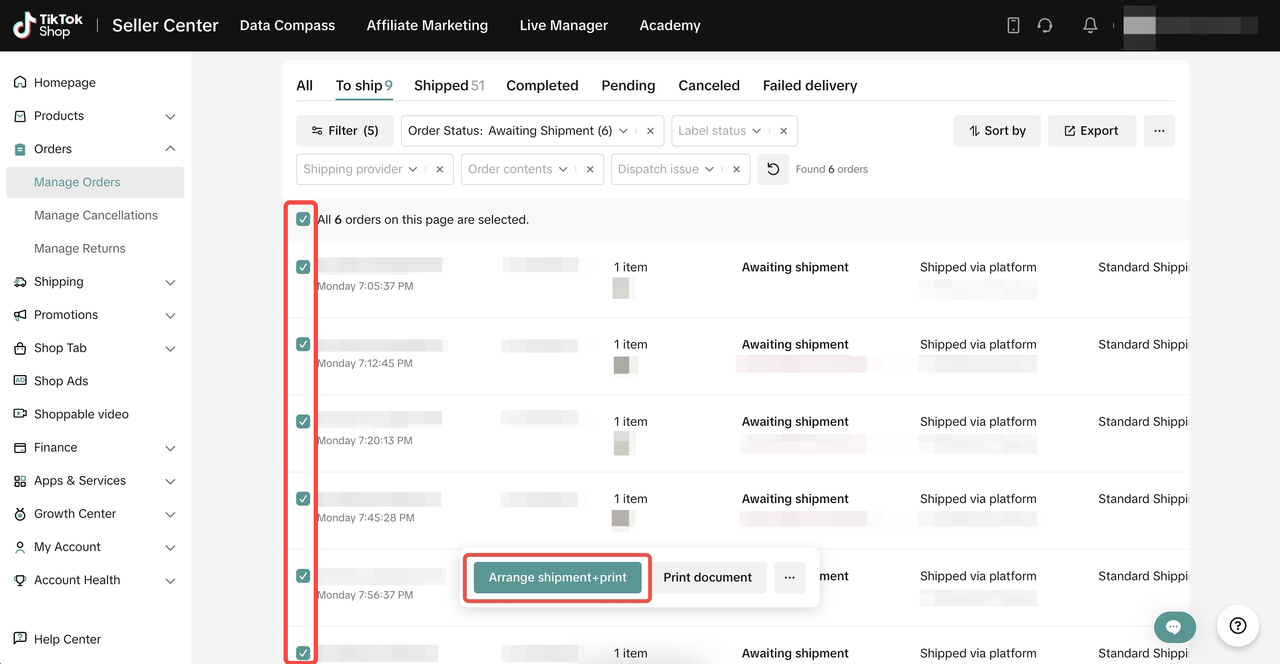 |
Will TikTok Shop issue qualified invoice for the fees I paid?
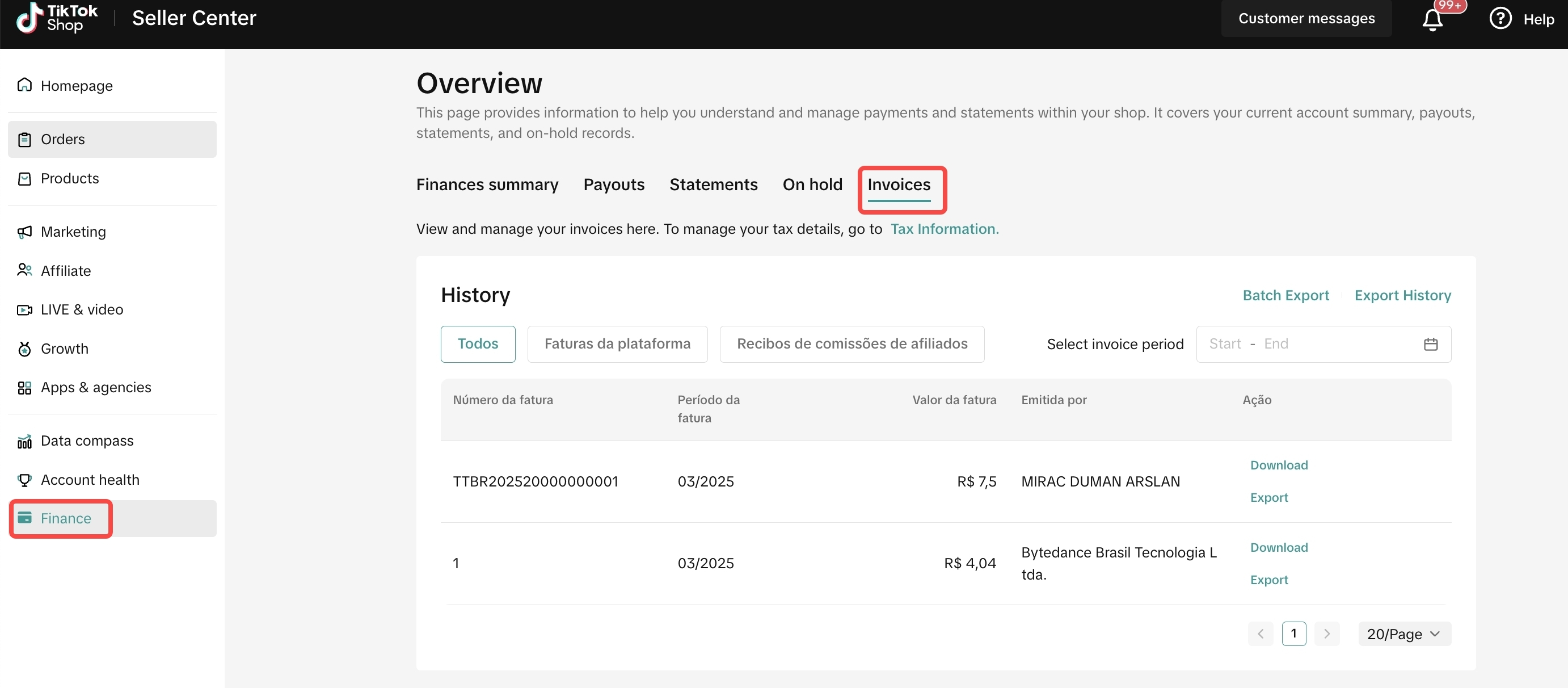
Yes, Bytedance Brasil Tecnologia Ltda. as the service provider will issue tax invoices monthly for the fees charged to you. You could download invoices from Seller center->Fiance->Invoices.TikTok Shop cannot issue an invoice for fees you paid to other parties, including but not limited to creators and TTS partners (TikTok Affiliate Partner, Creator Agency Partner etc.)
Will TikTok Shop issue an invoice for my sales to customers?
No, it is your responsibility to issue invoices for your sales to customers.Will TikTok Shop collect any taxes for my sales to customers?
No. In accordance with the existing regulations, TikTok Shop won't collect any taxes for your sales to customers. The collection of any applicable taxes is your responsibility. Consult your tax accountant if you have any questions.Will TikTok Shop issue an invoice for creator commissions?
No, it is you engaging creators to promote goods for your shop, and TikTok Shop won't issue invoices for the transactions between you and creators.In addition, TikTok Shop generates the billing statement of creators' commission you paid to creators and you could download it by accessing sellers center->Fiance.
What should I do if I need to update my information shown on the invoices for the fees I paid?
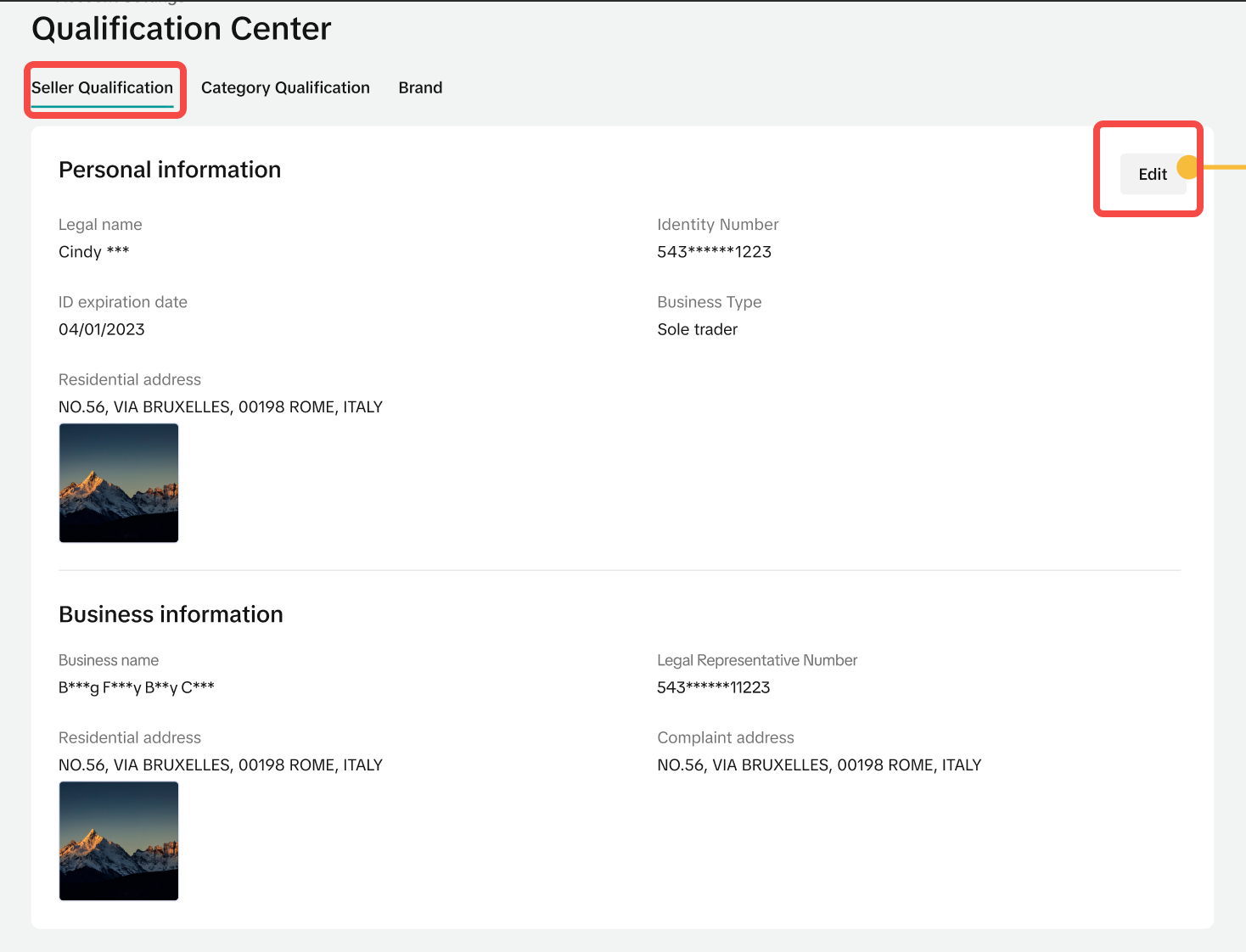
You could update your seller qualification via seller center (My account >Account Setting>Qualification Center)Please note:- The updated information could only be shown on the following invoices issued by TikTok Shop to you
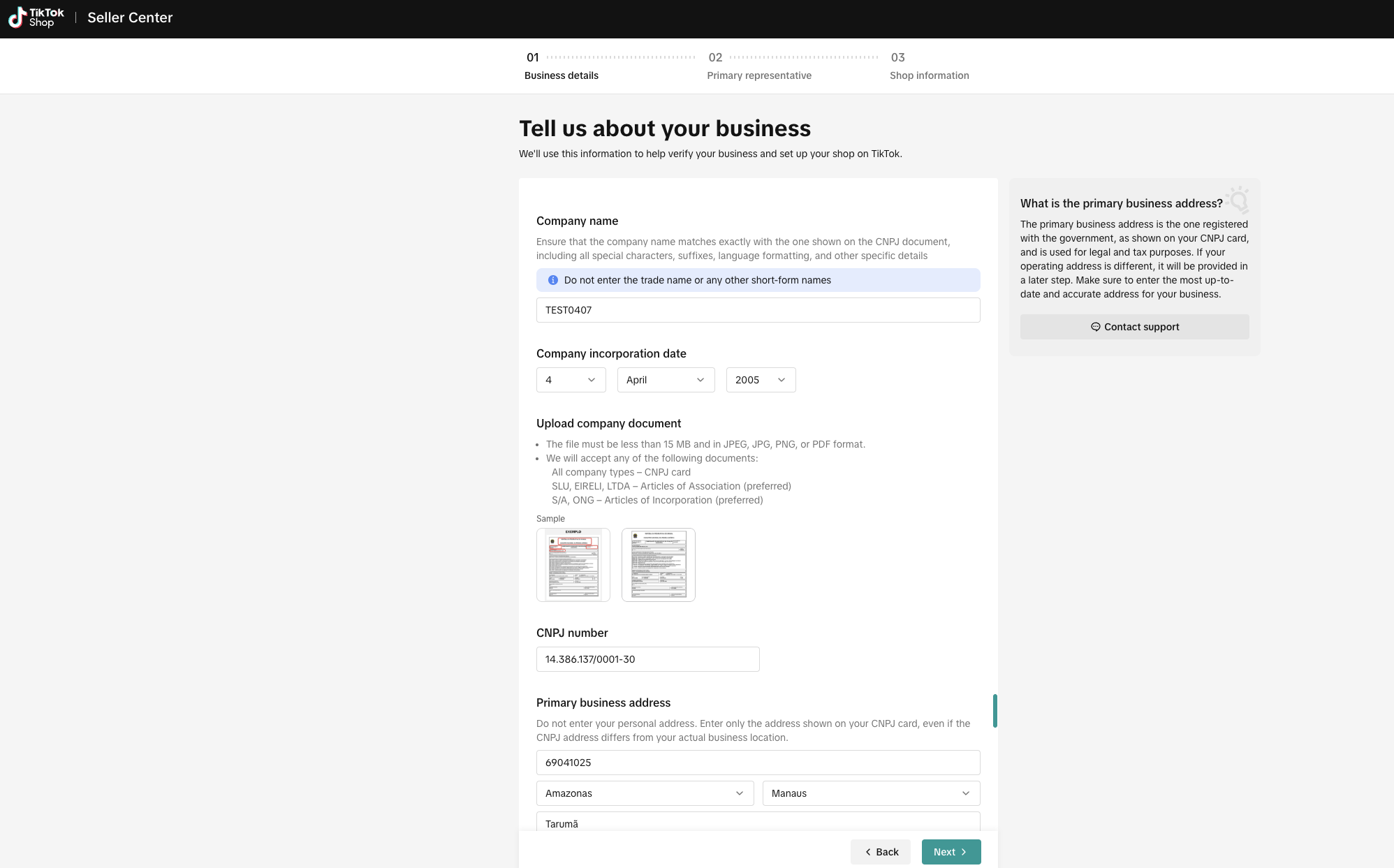
- Once the invoices for the fees charged by TikTok Shop are issued, it can not be cancelled and reissued. It is highly suggested that the information you fill in the onboarding phase is consistent with the company registration certificates, especially for company name, CNPJ, company address, zip code etc.
Onboarding | Seller Qualification Edit |
 |  |