

Guidelines for New Shop Probation Period
New Shop Probation Period
Welcome to TikTok Shop! We're glad you chose to sell with us. We understand how stressful it can be setting up a shop. Our Probation Period is designed to help you build a strong, trustworthy foundation before scaling your business on TikTok Shop.To protect buyer trust and support sustainable growth, all new shops on TikTok Shop start in a short ramp-up period with measured limits. Completing specific tasks and demonstrate reliable fulfillment, accurate listings, and strong customer service performance, these limits may increase and the shop may progress through different probation tiers until graduation.
Once the required criteria are met, the shop will graduate from the probation period and the probation restrictions will be lifted.
What Each Tier Allows
You can complete tasks to upgrade your shop from Beginner to Standard to Premium, and finally Pro status!
You can receive more orders every day and upload more products as you ascend the tiers:HOT TIP! You can always check your shop's current order and product listing details on the Probation page.
Probation Stage | Daily Order Limit | Total Active Listing Limit | Marketing Account Binding |
| Beginner |
|
|
|
| Standard |
|
| |
| Premium |
|
| |
| Pro (Graduation)🎉 |
|
| |
| NOTE: Seller order volume limits may be impacted while TikTok Shop completes platform and seller security checks. | |||
- At Beginner status, you can receive up to 50 orders every day and you can upload up to 1,000 products.
- At Standard status, you can receive up to 100 orders every day and you can upload up to 2,000 products.
- At Premium status, you can receive up to 200 orders every day and you can upload up to 3,000 products.
- Pro status means your shop has graduated and is no longer subject to daily order or product listing limits from the Probation Period—well done!
Graduating From Probation
Your shop will progress through tiers till graduation based on its performance. Tier upgrades are automatic and do not require manual application.Once your shop meets all the criteria for a specific tier, it will remain in that tier until it moves to a higher tier or graduates from the Shop Probation Period directly. Please note that shops do not need to progress through every tier in sequence.
Requirements | Beginner | Standard | Premium | Pro (Graduation)🎉 |
Days since Onboarding | By default, all new sellers start at Beginner. | ✅At least 30 days | ✅At least 30 days | ✅At least 30 days |
Total Live listing | ✅At least 10 | - | - | |
New Seller Quiz | ✅Pass | - | - | |
Total Delivered Orders | - | ✅At least 50 | ✅At least 100 | |
Unique Buyers | - | ✅At least 10 | ✅At least 20 | |
Compliance Violations (last 30 days) | ✅Less than 4 | ✅Less than 4 | ✅Less than 4 | |
Shop Performance Score (last 60 days) | ✅At least 3.0 | ✅At least 3.5 | ✅At least 3.5 |
- Delivered orders refer to orders that are successfully completed. Orders that are cancelled before delivery are not counted.
- Compliance violations refer to breaches of TikTok Shop policies, including selling counterfeit or IPR-infringing products, or listing prohibited products.
- Shop Performance Score reflects your shop's overall performance and customer experience. It is displayed on your shop page as a score from 0 to 5. For more details, refer to the Store Performance Score.
Tracking Your Probation Status
Your current probation status can be found on the Seller Center Homepage itself. Click into it to find out what else you need to do to hit the next status.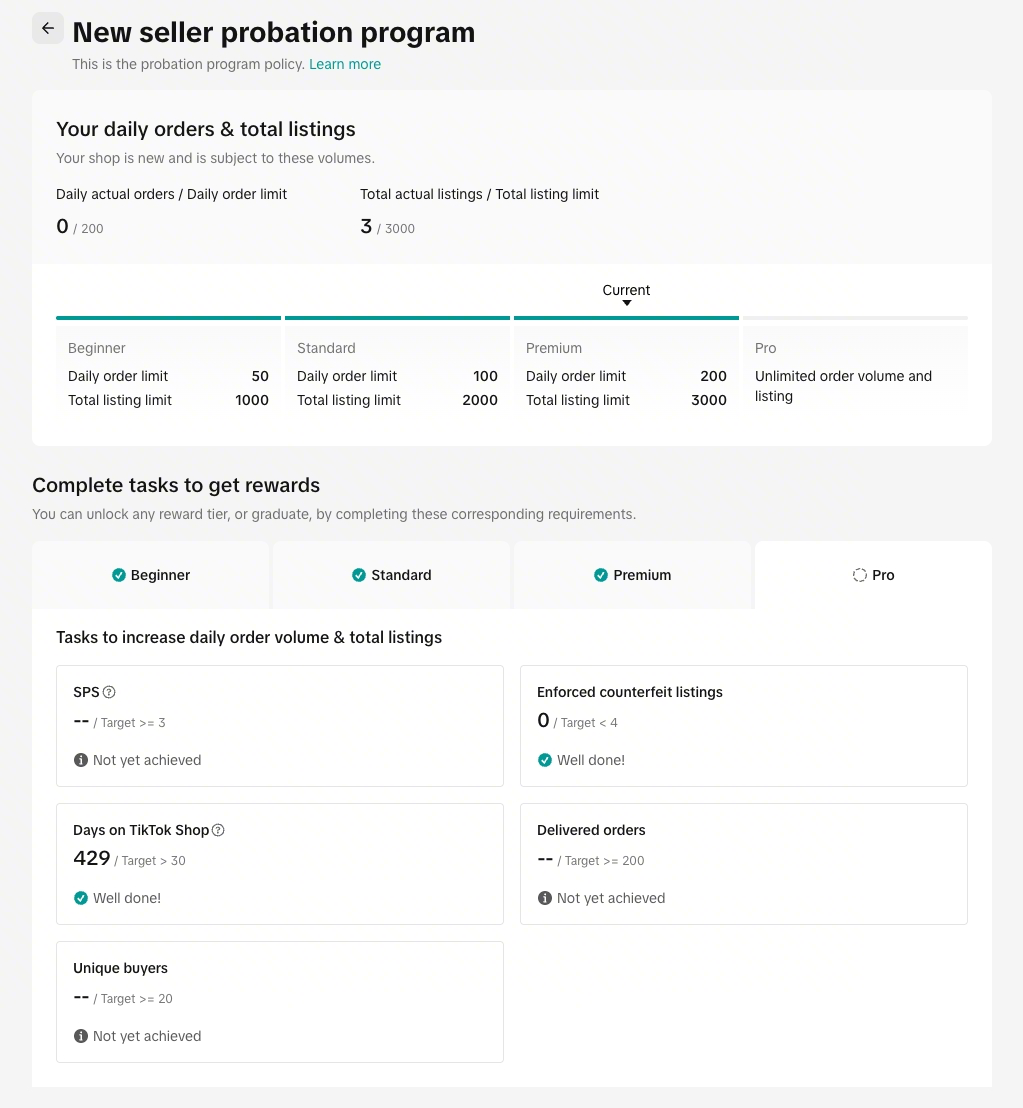
Frequently Asked Questions (FAQs)
Where can I find the New Seller Quiz?
- You can find the onboarding quiz in Seller Center: Account Health > Learning Center
How can I check if I have received any violations?
- You can access your violation records on the Shop Health page: Seller Center > Account Health > Shop Health
How can I increase my order limits?
- Order limits may increase when sellers progress to higher probation tiers by demonstrating strong operational performance and meeting platform requirements.
Will my existing listings be removed if I reach the listing limit?
No. Existing listings will remain active. However, you will not be able to upload new listings until the number of active listings falls below the limit.Where can I check my Shop Performance Score (SPS)?
You can view your Shop Performance Score (SPS) in Seller Center → Account Health.What happens after I graduate from probation?
Once a shop graduates from the probation period:- Order volume limits and active listing limits related to probation will be removed
- The shop will operate under the standard platform rules and policies